Configure Sticky Sessions
Pin each client to the same Web Service replica by enabling ALB cookie stickiness from the ingress annotations.
When you need sticky sessions (and when you don't)
Every Web Service with more than one replica is load balanced across its Pods, so consecutive requests from the same browser can land on different Pods. If your application keeps session state in memory — a login session, a shopping cart, an upload in progress — those requests break.
Stickiness makes the load balancer send a client back to the Pod it used before. It is a useful stopgap, but it is not a fix for in-memory state:
- The affinity dies with the Pod. Every deploy replaces all Pods, and every scale-in removes some, so sticky clients get reassigned and lose their session anyway.
- One Pod can end up with a disproportionate share of long-lived clients, which works against autoscaling.
The durable fix is to move session state to a shared backend — a Redis Dependency or your database — so any replica can serve any request. The Environment testing guide includes a test for exactly this failure. Reach for stickiness when you cannot change the application, or as a bridge while you externalize the session store.
Prerequisites
- Account in SleakOps
- A Cluster configured (Cluster docs)
- An Environment configured (Environment docs)
- A Web Service with the
publicorprivateservice schema.internalservices have no Ingress, so stickiness does not apply to them. - A role other than Viewer — Viewers cannot edit a Workload's configuration.
Let's Start
SleakOps exposes Web Services through an AWS Application Load Balancer, and stickiness is a target group attribute on that load balancer. You enable it by adding one annotation to the Ingress that SleakOps generates for your Web Service.
Add the stickiness annotation
- Open your Web Service from Workloads > Web Services.
- In the Connection Settings section, click Edit Ingress.
- In the Key/Value table at the bottom of the dialog, add this pair:
| Field | Value |
|---|---|
| Key | alb.ingress.kubernetes.io/target-group-attributes |
| Value | stickiness.enabled=true,stickiness.type=lb_cookie,stickiness.lb_cookie.duration_seconds=86400 |
- Leave Deploy? enabled and click Update ingress config. The annotation only reaches the cluster on the next deploy.
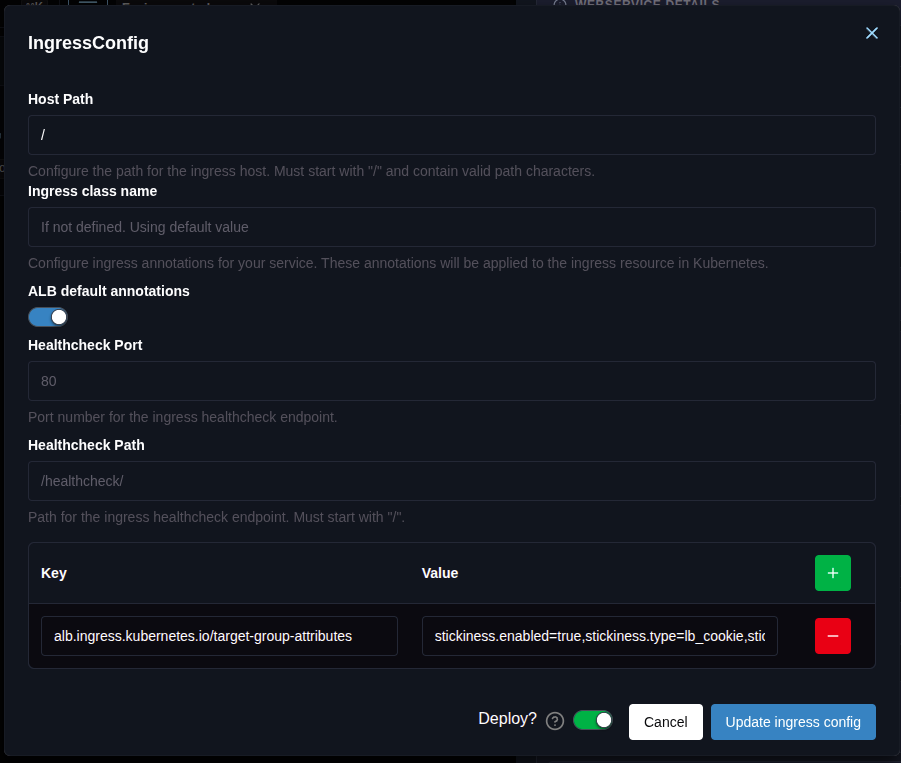
Every other field keeps its default — you only add the annotation row.
The same dialog has an ALB default annotations switch. Keep it on. It generates the annotations the Ingress needs to work at all — target-type: ip, the load balancer group name, and the health check settings. Your extra annotations are merged on top of those, so there is no reason to disable it.
The target-type: ip that SleakOps sets by default is also a hard requirement for ALB stickiness, and it is what makes stickiness useful here: the load balancer registers Pod IPs as targets, so the cookie pins a client to a specific Pod rather than to a Node.
Set it from the Web Service form
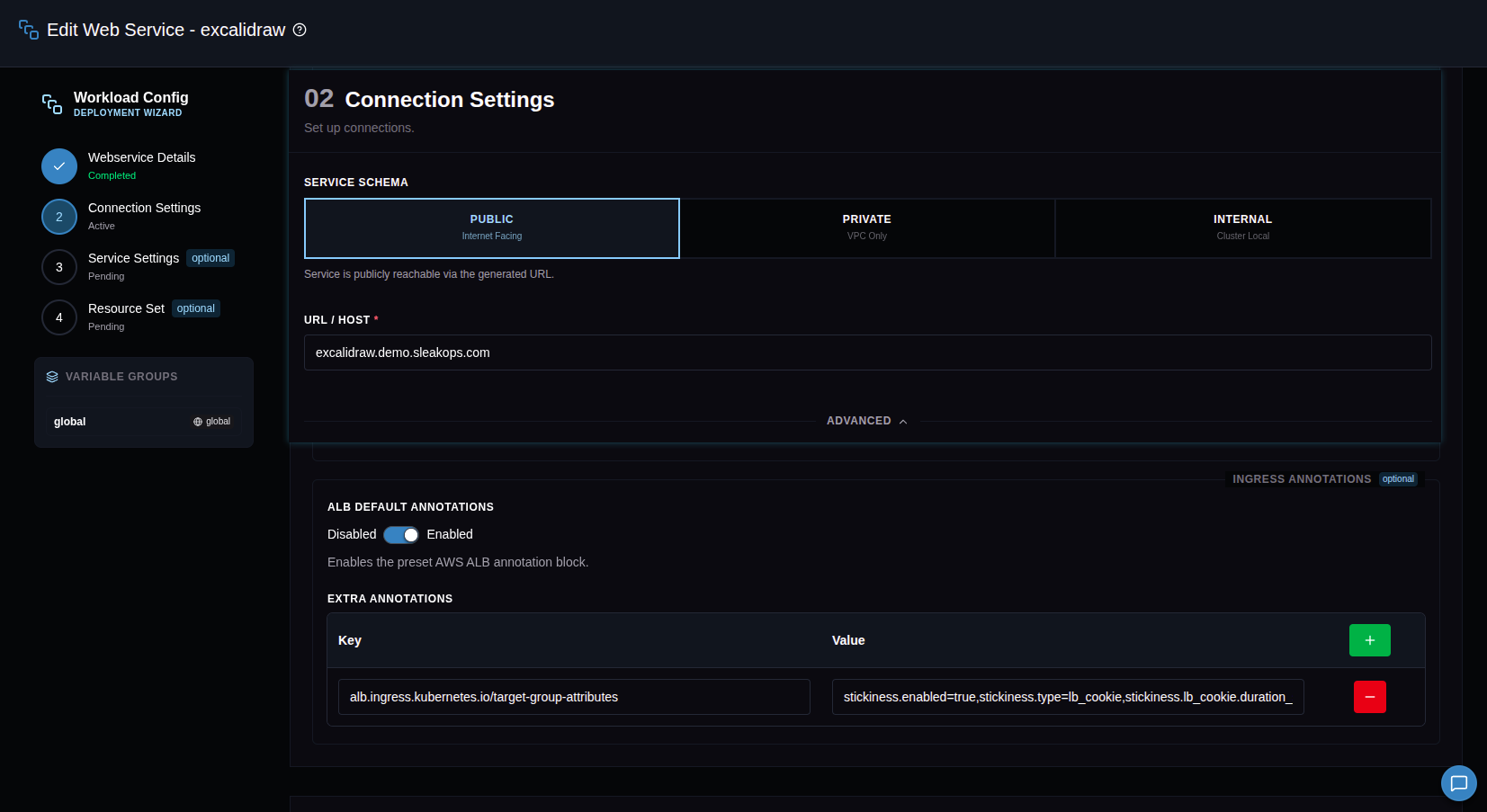
The same field is available in the Web Service form, whether you are creating the Workload or editing it. In the Connection Settings step, expand the Advanced section and fill in Extra Annotations under Ingress Annotations. The annotation applies to every host of the Web Service — its default URL and any custom Domain pointing at it.
Tune the cookie
The annotation value is a comma-separated list of target group attributes. It replaces the whole set of stickiness attributes, so send every pair you need in a single value.
| Attribute | Description | Default |
|---|---|---|
| stickiness.enabled | Turns stickiness on. true or false. | false |
| stickiness.type | lb_cookie for a cookie the load balancer generates, app_cookie to follow one your application sets. | — |
| stickiness.lb_cookie.duration_seconds | How long the affinity lasts with lb_cookie. From 1 second to 604800 (7 days). | 86400 (1 day) |
| stickiness.app_cookie.cookie_name | Name of your application's cookie. Required with app_cookie. | — |
| stickiness.app_cookie.duration_seconds | How long the affinity lasts with app_cookie. From 1 second to 604800 (7 days). | 86400 (1 day) |
With app_cookie, the cookie name cannot start with AWSALB, AWSALBAPP or AWSALBTG — those prefixes are reserved by the load balancer.
For example, a two-hour affinity driven by your own JSESSIONID cookie:
stickiness.enabled=true,stickiness.type=app_cookie,stickiness.app_cookie.cookie_name=JSESSIONID,stickiness.app_cookie.duration_seconds=7200
See the ALB sticky sessions documentation for the full behavior of each mode.
Verify it
Once the deploy finishes, verify it end to end:
1. The load balancer sets a cookie. Request your service and look at the response headers:
curl -sI https://myservice.myenv.sleakops.com | grep -i set-cookie
With lb_cookie you get two cookies: AWSALB, and a second AWSALBCORS carrying the same information plus the SameSite attribute that some browsers require for cross-origin requests. The load balancer always sends both, on CORS and non-CORS responses alike.
With app_cookie you also get two: the one your application sets, and AWSALBAPP-0 generated by the load balancer. Cookies over 4 KB are sharded into further fragments — AWSALBAPP-1 and up, to a maximum of four shards and 16 KB in total.
If none of these appear, the annotation did not reach the Ingress — go back to step 1 and confirm the deploy completed.
2. The same Pod answers. Save the cookies and replay them:
curl -s -c cookies.txt https://myservice.myenv.sleakops.com > /dev/null
for i in $(seq 1 10); do curl -s -b cookies.txt https://myservice.myenv.sleakops.com/your-debug-path; done
If your application exposes its hostname anywhere — the HOSTNAME environment variable inside a Pod is the Pod name — every response should report the same one. Otherwise, open the Web Service logs in Headlamp and confirm that only one Pod records those requests.
3. The annotation is on the live object. If either check above fails, open the Ingress for your Environment's Namespace in Headlamp and confirm that alb.ingress.kubernetes.io/target-group-attributes appears in its annotations with the value you set. If it is missing, the deploy did not go through; if it is there, the problem is downstream — check that your Web Service has more than one replica.
Limitations
- Affinity does not survive Pod replacement. Deploys, scale-in and Node consolidation all reassign sticky clients. Stickiness reduces how often a client changes Pod; it never guarantees it won't.
- It is not a substitute for shared session state. If losing a session is unacceptable, store it in Redis or your database.
- The Kubernetes
sessionAffinity: ClientIPsetting has no effect here. The load balancer sends traffic straight to Pod IPs, bypassing the Service's own load balancing, so affinity has to be configured on the load balancer. ssl-redirectandlisten-portscannot be overridden through Extra Annotations on hosts served over HTTPS — SleakOps sets those last for TLS hosts.internalWeb Services have no Ingress, so there is nothing to annotate.
Next Steps
- Web Service configuration — the rest of the Workload settings, including replicas and autoscaling
- Manifests — edit the generated Ingress YAML directly when an annotation is not enough
- Values — override any generated Helm value, including per-host ingress settings