Deployment
A Deployment in Sleakops signifies the installation of a new version of your application. This involves three primary components, together forming a Helm Release:
- Releases: These are versioned combinations of your Workloads including WebServices, Workers, CronJobs, and Hooks.
- Build Image: Represented by a Build.
- Configuration Values: These comprise resources like Volumes and VariableGroups.
When there's an update to any of these resources that wasn't deployed immediately, SleakOps queues it as a pending change and shows a Publish badge on the environment.
Deploying your ProjectEnv
Upon creating a Deployment, we fetch the image corresponding to the Build to be deployed. Before this, we execute the Helm Release in the appropriate cluster namespace. This Helm release includes necessary Kubernetes services, ingresses, workers, and other services.
Various methods exist to generate a Deployment. These are outlined below. Note that we force certain Deployments. For details, refer to More on Deployment.
- Workloads: Provides a switcher allowing you to decide whether to run a new Deployment.
- VariableGroup: Operates similarly to Workloads but doesn't create a new Release. Instead, it only updates the values of the Deployment.
- Dependency: Triggers a Deployment automatically. Delve deeper into this at More on Deployment.

Manual Deployment
If you skip deploying your changes immediately, or if your modification doesn't enforces a deployment, you have three methods to execute a Deployment:
- Build section: Utilizing the Deploy button, you can determine which Build to deploy.
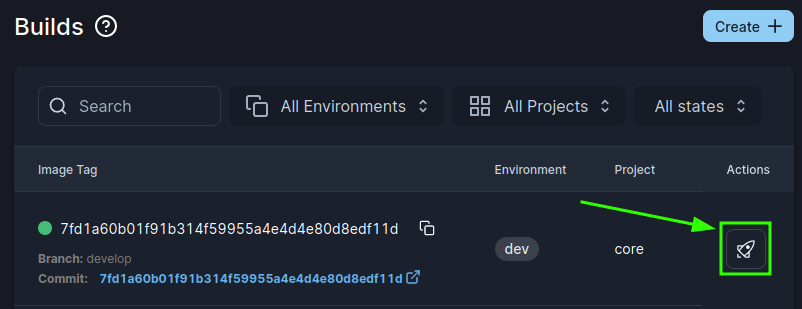
Pending changes
-
Publish badge: environments with content pending that was not yet deployed on the cluster show a Publish badge in the Projects list, the Project dashboard and the Deployments list. Clicking it opens the pending deployment's detail, where you review the accumulated changes and publish them. See Pending Changes & Publishing.
-
Via the CLI .