Technical Documentation - Dockertron
Executive Summary
Dockertron is an automated dockerization system that analyzes your source code and automatically generates the necessary infrastructure to run your application in Docker containers. The system uses artificial intelligence to understand your project structure and create the appropriate configuration files.
You can find it in SleakOps in the Projects > Configuration > Dockertron section.
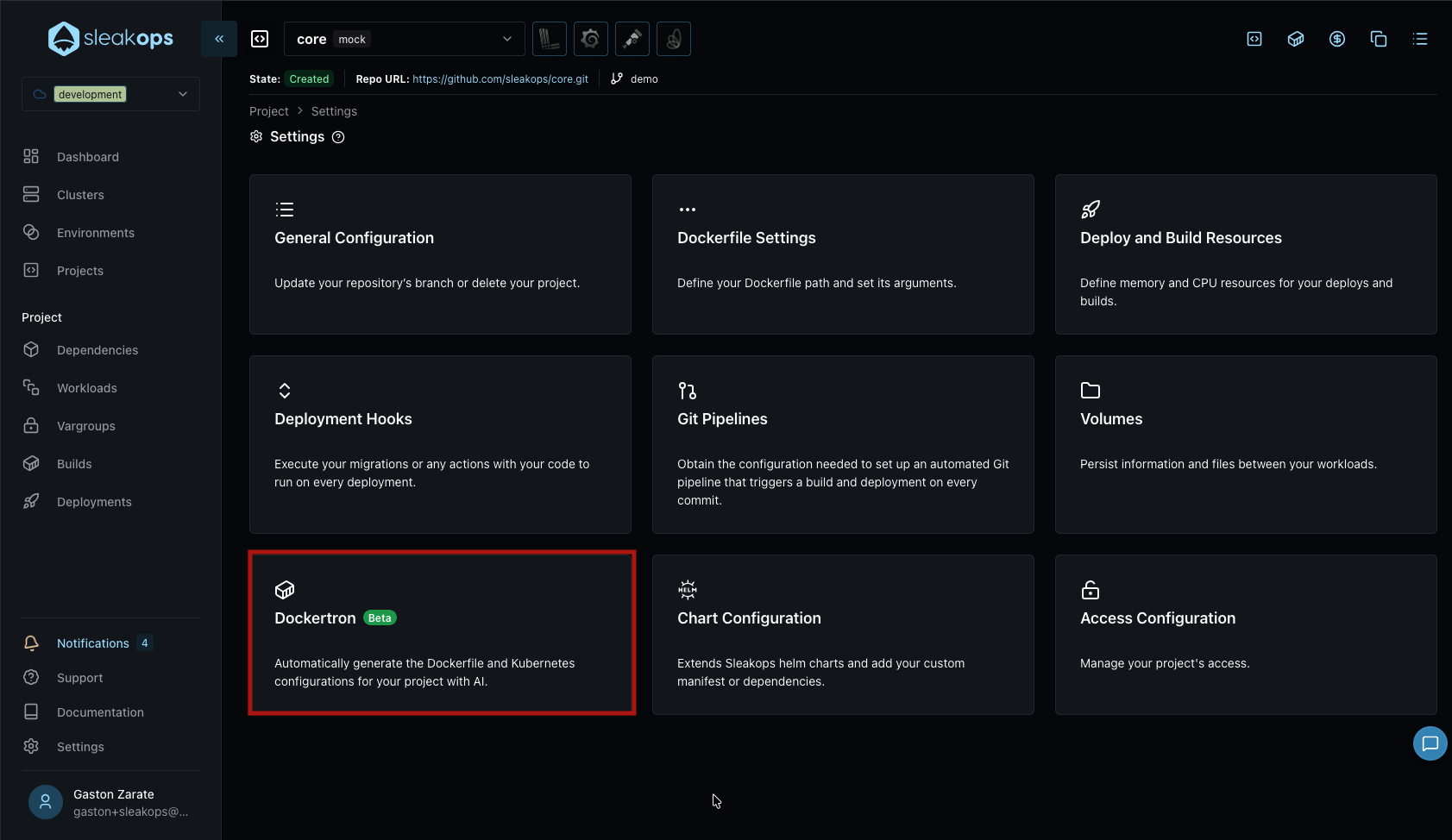
Dockertron automates the containerization process of your application following these steps:
- Repository Analysis: Examines your source code structure
- Service Identification: Detects which components of your application need to run
- Dockerfile Generation: Creates optimized Dockerfiles for each service
- Docker Compose Creation: Generates a docker-compose.yml file that orchestrates all services
- Infrastructure Configuration: Prepares the configuration for deployment on SleakOps
Dockerization Process Flow
1. Submit the Project
To start the dockerization process, you must complete the Dockertron form in three steps:
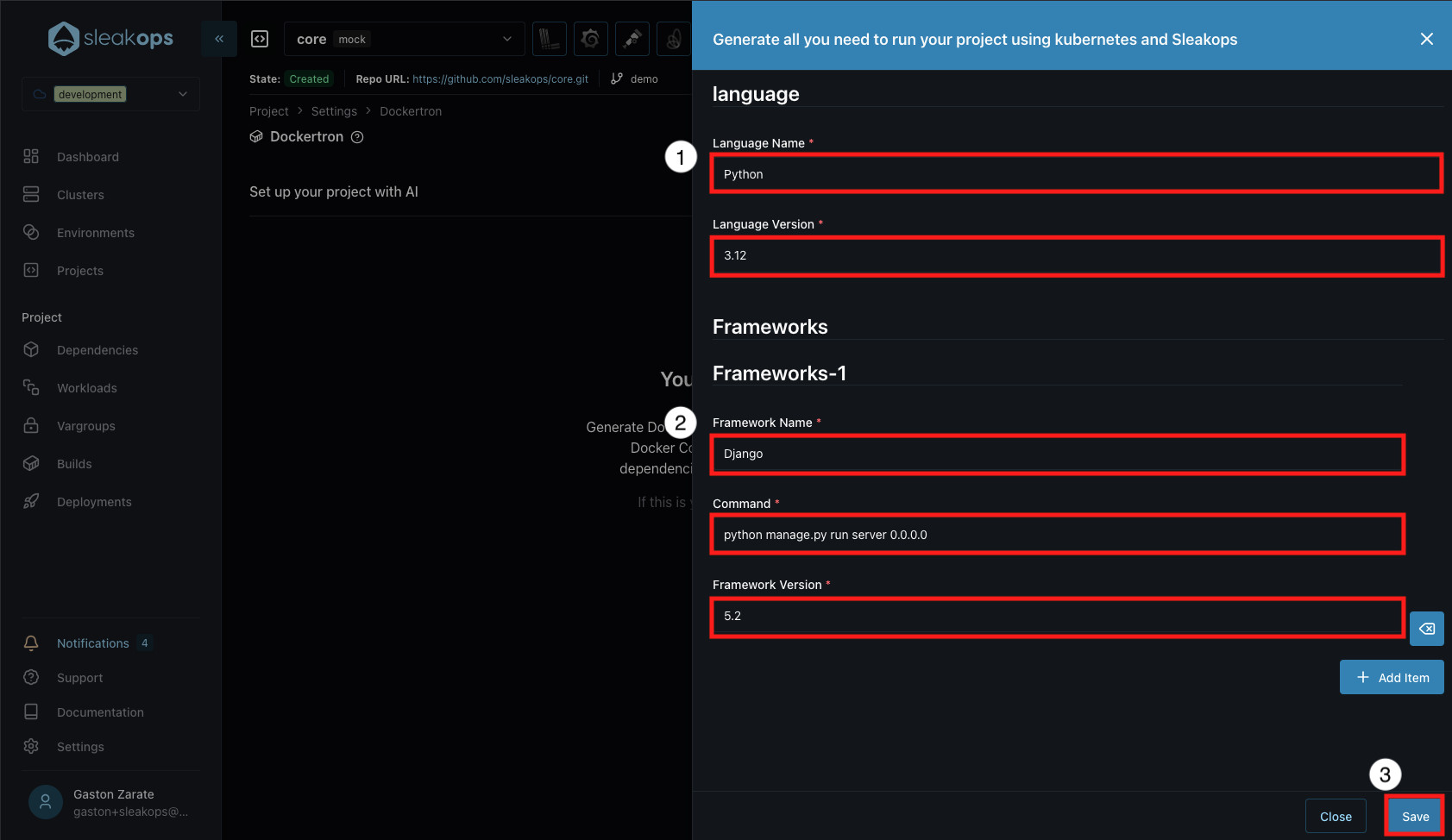
Step 1: Language Information
Specify the main programming language of your project:
- Language Name: Language name (e.g., Python, Node.js, Java, Go)
- Language Version: Specific language version (e.g., 3.12, 18.0, 11)
Step 2: Application Frameworks
Configure the frameworks your application uses. You can add multiple frameworks:
- Framework Name: Framework name (e.g., Django, Express, Spring Boot)
- Command: Command to run the framework (e.g.,
python manage.py runserver 0.0.0.0) - Framework Version: Framework version (e.g., 5.2, 4.18.2)
You can add more frameworks by clicking "+ Add Item".
2. Intelligent Analysis
The system performs a deep analysis of your project:
Phase 1: Repository Audit
- Confirms the main programming language
- Confirms frameworks and libraries used
- Analyzes folder structure
- Identifies configuration files (package.json, requirements.txt, etc.)
Phase 2: Service Identification
The system automatically detects:
- Web applications (frontend, backend)
- APIs and microservices
- Workers and background processes
- Required databases
- Cache services (Redis, Memcached)
- Message queues (RabbitMQ, SQS)
3. File Generation
Dockerfiles
For each service that requires building, a Dockerfile is generated that includes:
- Appropriate base image
- Dependency installation
- Environment configuration
- Startup commands
- Healthchecks
- Security and performance optimizations
Docker Compose
A docker-compose.yml file is generated that:
- Defines all services
- Configures networks between services
- Establishes volumes for data persistence
- Defines environment variables
- Configures ports and service exposure
- Establishes dependencies between services
README
Documentation is generated with:
- Instructions to run the project
- Necessary commands
- Required configurations
- Basic troubleshooting
4. SleakOps Preparation
The system generates the infrastructure configuration for SleakOps, identifying:
- Workloads
- Dependencies
- Environment Variables
5. Pull Request Generation
Once the analysis and file generation is complete, Dockertron automatically creates a Pull Request in your repository with all generated configuration files:
- Dockerfiles
- docker-compose.yml
- README.md with instructions
- Additional configuration files
This allows you to:
- Review all proposed changes before integrating them
- Comment and request adjustments if necessary
- Approve and merge when satisfied with the configuration
- Maintain a clear history of changes in your repository
Repository Integration
Upon completion of the process, Dockertron:
- Generates a Pull Request in your repository with all Docker configuration files
- Sends the information to SleakOps so you can easily deploy from the console with the configurations recommended by the AI agent
This way, you maintain full control over changes to your code while leveraging SleakOps automation.
Complete Example
Input Project
my-app/
├── backend/
    ├── package.json
    ├── server.js
    └── ...
Generated Output
Detected Services:
- Backend (Node.js API)
- Frontend (React App)
- Worker (Python)
Identified Dependencies:
- PostgreSQL (for backend)
- Redis (for cache and queues)
Generated Files:
backend/Dockerfiledocker-compose.ymlREADME.md
Frequently Asked Questions
How long does the process take?
Typically between 5-30 minutes, depending on the size and complexity of the project.
What if my project has special configurations?
You can provide additional context in the contexts field when submitting the request, indicating specific frameworks, versions, or special configurations.
Can I review the files before deployment?
Yes, all generated files are sent back and can be reviewed before proceeding with deployment.
What happens if the process fails?
The system sends a detailed error message indicating what went wrong, allowing adjustments, retries, and modifications to the submitted information so the AI agent can generate the correct configuration.
Can the generated files be modified?
Yes, the generated files are completely editable and can be adjusted according to your specific needs.
Document version: 1.0 Last update: November 2025