KEDA
KEDA — Kubernetes-based Event-Driven Autoscaler — is an Addon that lets workloads in your Cluster scale based on external signals: the depth of an SQS queue, the lag of a Kafka consumer group, a CloudWatch alarm, the number of pending Redis keys, the count of rows in a database, and dozens more. Where Kubernetes' built-in HPA can only scale on CPU and memory of the Pods themselves, KEDA reaches outside the Cluster, asks the source how much work is waiting, and scales the workload accordingly — including down to zero replicas when there is nothing to do.
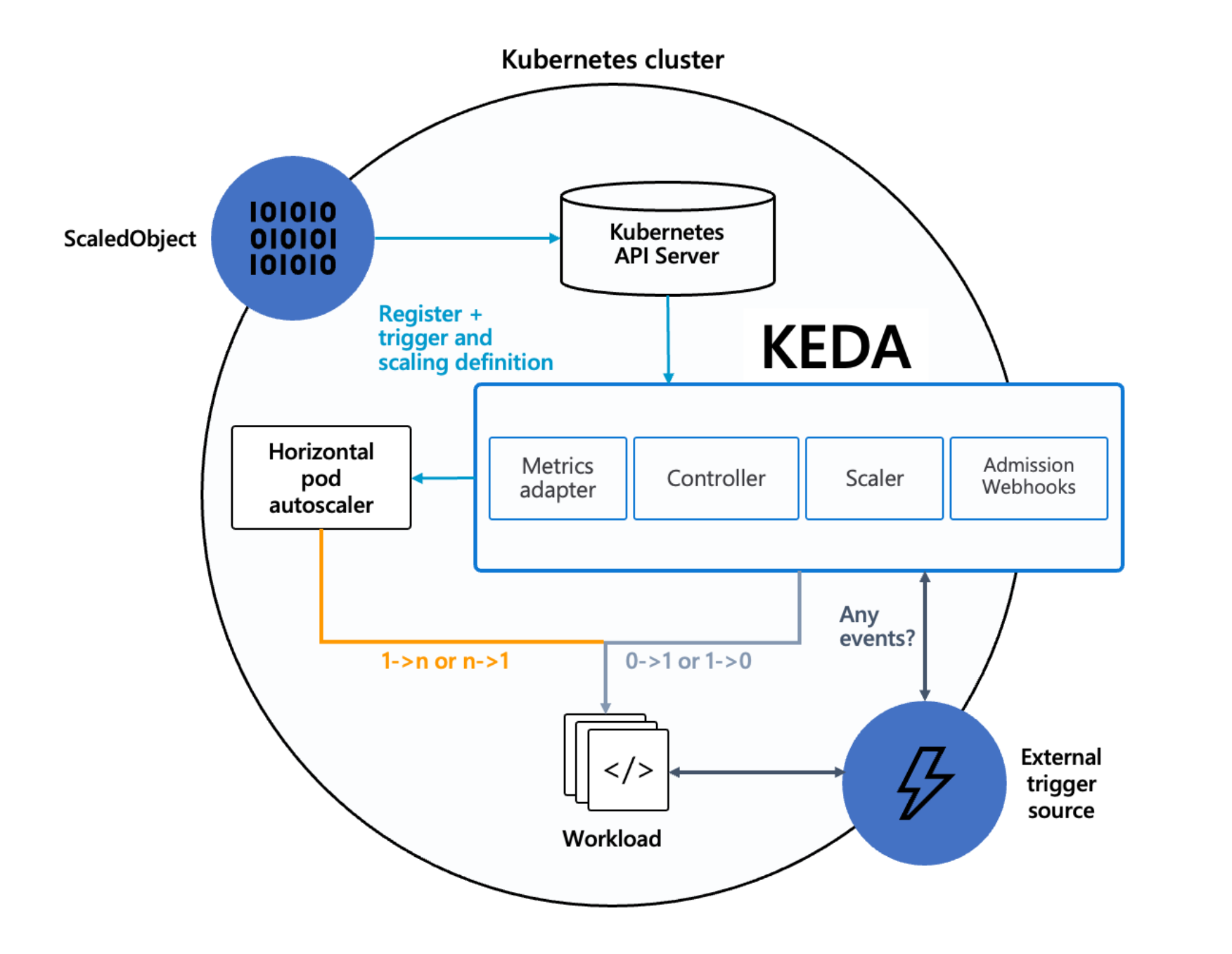
SleakOps installs the KEDA operator and wires the IAM permissions it needs to read AWS metrics. You then define the scaling rules for each of your Workloads as Kubernetes manifests (ScaledObject resources) — KEDA reads those manifests, watches the configured triggers, and adjusts replicas behind the scenes.
The KEDA addon is currently in Beta. The install and AWS-permissions wiring are stable, but the underlying configuration may still evolve.
FAQs
What is KEDA and when should I use it?
Reach for KEDA whenever the natural scaling signal for a Workload lives outside the Pod. Common cases on SleakOps:
- A worker that drains an SQS queue — scale the Deployment with queue depth, down to zero between bursts.
- A consumer of a Kafka topic — scale on consumer-group lag instead of CPU.
- A scheduled batch — scale up on a cron trigger, scale back down to zero when the window ends.
- A processor reacting to CloudWatch metrics (RDS connection count, custom application metrics, etc.).
When you only need to scale on the Pod's own CPU/memory, the built-in HPA is enough — but KEDA can model that case too (see the CPU/memory template below) if you want all your scaling rules in one place.
How do I install KEDA on my Cluster?
From the SleakOps console:
- Open the Clusters section and locate the target Cluster.
- Click Manage Addons on the Cluster card.
- In the addon list find Keda and open its detail drawer.
- (Optional) Add one or more AWS managed policies to AWS Managed Policy Names — see the next FAQ.
- Click Install.
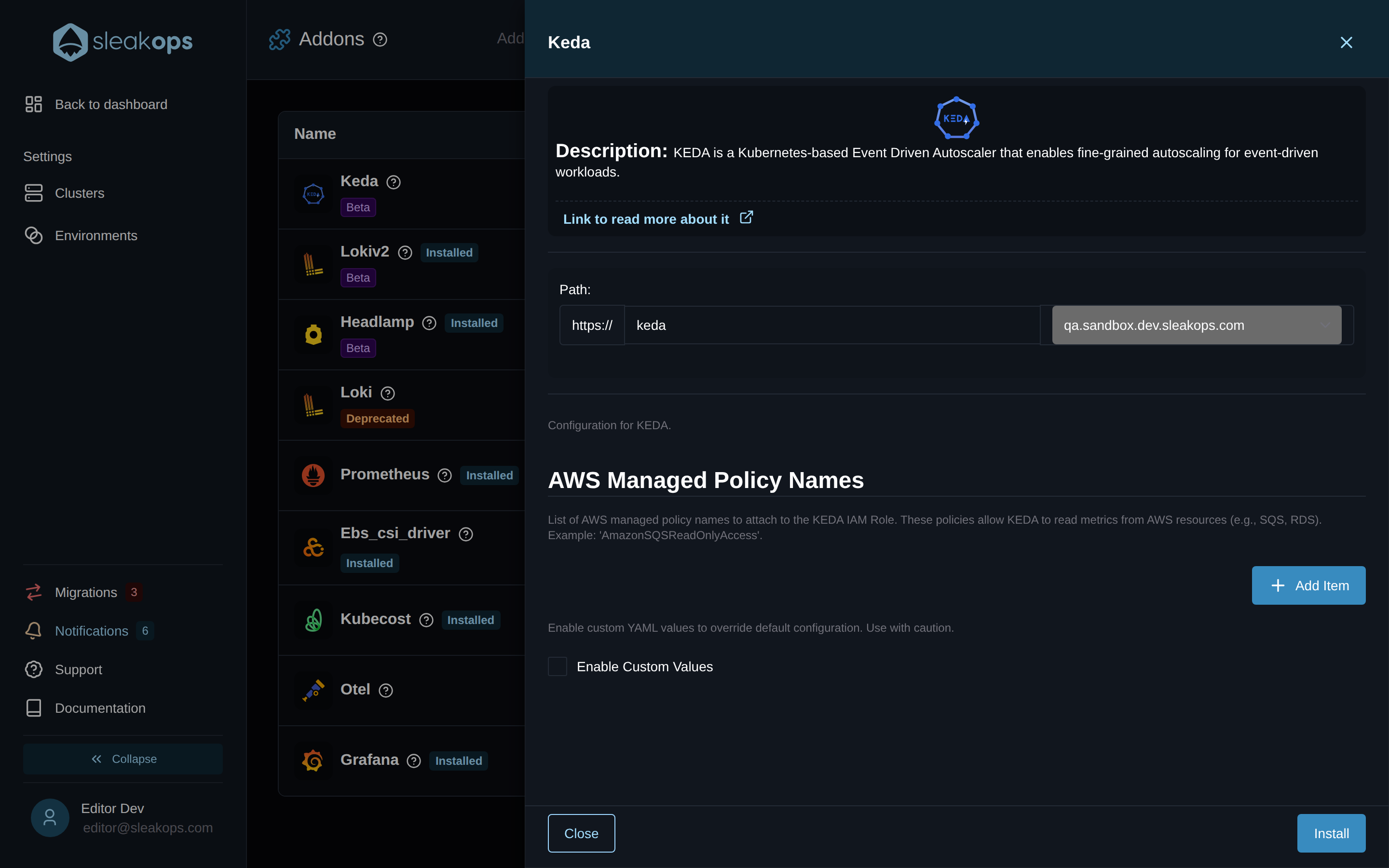
SleakOps deploys the KEDA operator, its metrics adapter, the admission webhooks, and the ServiceAccount with the IAM role attached. No further setup is needed inside the Cluster — once it shows Installed in the addons list, KEDA is ready to react to ScaledObject manifests you apply to any Namespace.
What do I put in "AWS Managed Policy Names"?
KEDA's AWS scalers (SQS, CloudWatch, DynamoDB Streams, Kinesis, …) need to read metrics from your AWS account to know how much work is waiting. SleakOps gives KEDA its own IAM role through IRSA (IAM Roles for Service Accounts), and the AWS Managed Policy Names field is where you list the AWS managed policies that role should carry.
Add one entry per policy — exactly as AWS spells it — for example:
| You want KEDA to scale on… | Add this policy |
|---|---|
| SQS queue depth | AmazonSQSReadOnlyAccess |
| CloudWatch metrics | CloudWatchReadOnlyAccess |
| DynamoDB Streams | AmazonDynamoDBReadOnlyAccess |
| Kinesis stream metrics | AmazonKinesisReadOnlyAccess |
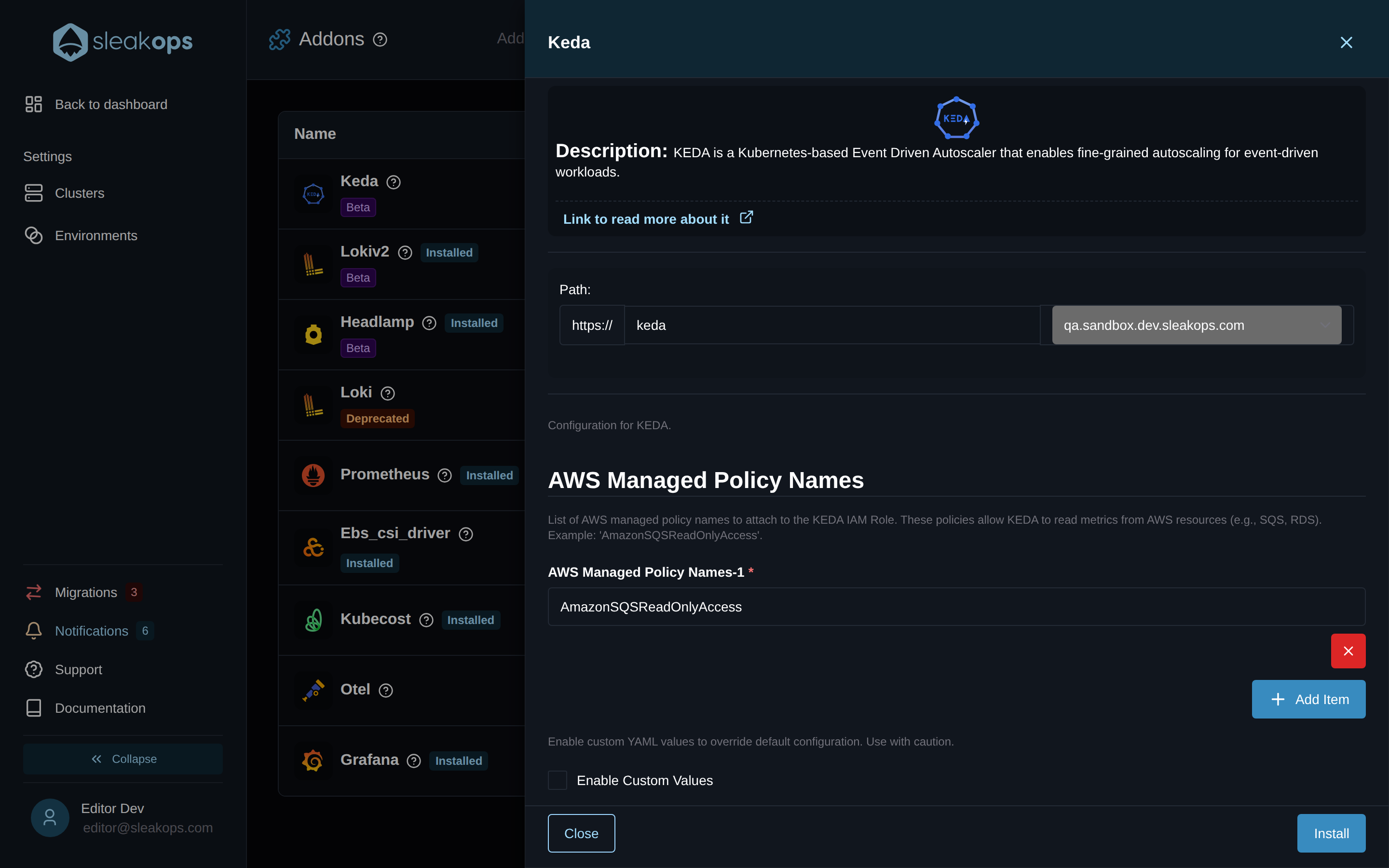
You can leave the list empty if you only plan to use non-AWS triggers (Kafka, Redis, cron, RabbitMQ, …) — KEDA still installs and works for those. Policies can be added or removed later by re-opening the addon's drawer and clicking Update.
KEDA only needs to read metrics. Stick to *ReadOnlyAccess policies — there is no scenario in which KEDA should write to a queue, a stream, or a table.
How do I actually scale a Workload with KEDA?
KEDA is configured through Kubernetes manifests you define alongside your Workload. SleakOps does not generate these — you apply them yourself (via kubectl apply, Helm, or whatever manifest pipeline your Project uses). The two patterns below cover most use cases.
Pattern 1 — Scale on SQS queue depth (event-driven)
apiVersion: keda.sh/v1alpha1
kind: ScaledObject
metadata:
  name: order-worker-scaler
  namespace: my-app
spec:
  scaleTargetRef:
    name: order-worker          # the Deployment to scale
  minReplicaCount: 0            # scale to zero when idle
  maxReplicaCount: 20
  pollingInterval: 30           # check the queue every 30 seconds
  cooldownPeriod: 300           # wait 5 min of idle before scaling down to 0
  triggers:
    - type: aws-sqs-queue
      authenticationRef:
        name: keda-aws-trigger-auth
      metadata:
        queueURL: https://sqs.us-east-1.amazonaws.com/123456789012/orders
        queueLength: "10"        # one Pod per 10 messages in the queue
        awsRegion: us-east-1
        identityOwner: operator  # use KEDA's ServiceAccount (IRSA)
---
apiVersion: keda.sh/v1alpha1
kind: TriggerAuthentication
metadata:
  name: keda-aws-trigger-auth
  namespace: my-app
spec:
  podIdentity:
    provider: aws                # KEDA reads SQS using the IAM role
                                 # that SleakOps attached via awsPolicyNames
The TriggerAuthentication is what connects the manifest to the IRSA role SleakOps set up — it's why entering AmazonSQSReadOnlyAccess in the addon form is the only AWS-side configuration you need.
Pattern 2 — Scale on CPU and memory (HPA replacement)
If you simply want richer HPA-style scaling, KEDA can do it without any external trigger or AWS permission:
apiVersion: keda.sh/v1alpha1
kind: ScaledObject
metadata:
  name: web-api-scaler
  namespace: my-app
spec:
  scaleTargetRef:
    name: web-api
  minReplicaCount: 2            # keep at least 2 replicas hot
  maxReplicaCount: 12
  triggers:
    - type: cpu
      metricType: Utilization
      metadata:
        value: "70"             # scale up when avg CPU > 70%
    - type: memory
      metricType: Utilization
      metadata:
        value: "80"
For the full catalogue of triggers (Kafka, Redis, Prometheus, cron, NATS, MongoDB, …) refer to the KEDA Scalers documentation .
How do I deploy ScaledObject manifests through SleakOps?
ScaledObject manifests through SleakOps?You can deliver ScaledObject (and TriggerAuthentication) manifests to your Cluster without leaving the SleakOps console. Two paths are available — pick based on where the manifest needs to live.
Option 1 — KEDA addon Custom Values (extraObjects, cluster-scoped)
The upstream KEDA chart exposes an extraObjects list that ships any K8s manifest alongside the operator. Open the KEDA addon's detail drawer, toggle Enable Custom Values, and paste the YAML:
extraObjects:
  - apiVersion: keda.sh/v1alpha1
    kind: ClusterTriggerAuthentication
    metadata:
      name: aws-irsa
    spec:
      podIdentity:
        provider: aws
  - apiVersion: keda.sh/v1alpha1
    kind: ScaledObject
    metadata:
      name: order-worker-scaler
      namespace: my-app
    spec:
      scaleTargetRef:
        name: order-worker
      minReplicaCount: 0
      maxReplicaCount: 20
      triggers:
        - type: aws-sqs-queue
          authenticationRef:
            kind: ClusterTriggerAuthentication
            name: aws-irsa
          metadata:
            queueURL: https://sqs.us-east-1.amazonaws.com/123456789012/orders
            queueLength: "10"
            awsRegion: us-east-1
These resources are owned by the KEDA addon release, which makes this the right path for cluster-scoped resources (ClusterTriggerAuthentication) and for any ScaledObject whose target namespace you set explicitly. Editing the YAML and clicking Update re-applies the set in place.
Option 2 — Project Chart Configuration (namespace-scoped, per-Project)
When the ScaledObject should live in the same namespace as the Workload it scales, deliver it through Project > Settings > Chart Configuration. The Templates field accepts raw Helm template YAML rendered as part of the Project's release, so {{ .Values.global.namespace }} resolves to the right Environment automatically:
apiVersion: keda.sh/v1alpha1
kind: ScaledObject
metadata:
  name: order-worker-scaler
  namespace: {{ .Values.global.namespace }}
spec:
  scaleTargetRef:
    name: order-worker-deployment
  minReplicaCount: 0
  maxReplicaCount: 20
  pollingInterval: 30
  cooldownPeriod: 300
  triggers:
    - type: aws-sqs-queue
      authenticationRef:
        name: keda-aws-trigger-auth
      metadata:
        queueURL: https://sqs.us-east-1.amazonaws.com/123456789012/orders
        queueLength: "10"
        awsRegion: us-east-1
        identityOwner: operator
---
apiVersion: keda.sh/v1alpha1
kind: TriggerAuthentication
metadata:
  name: keda-aws-trigger-auth
  namespace: {{ .Values.global.namespace }}
spec:
  podIdentity:
    provider: aws
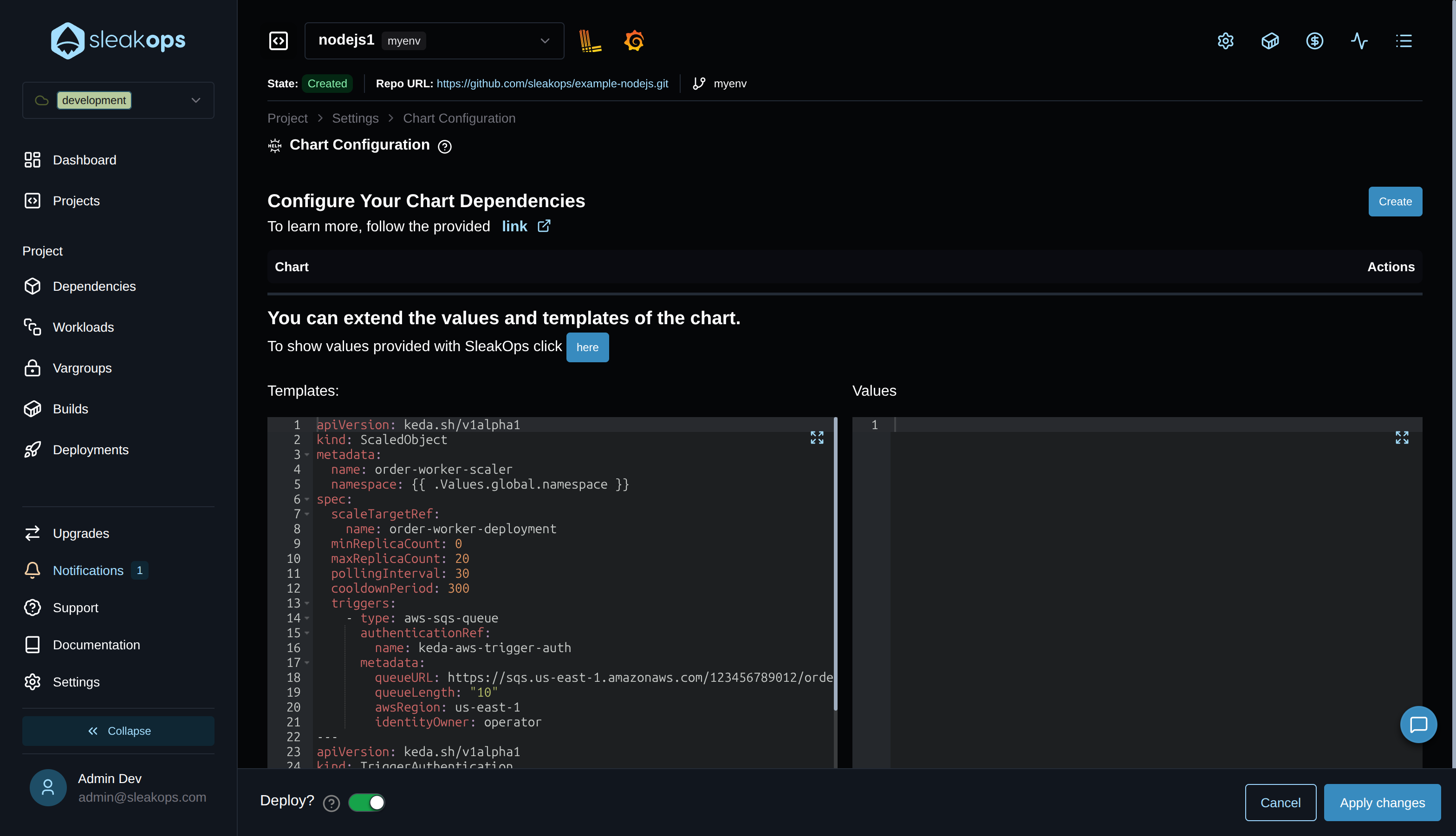
With Deploy? toggled on, clicking Apply changes rolls out a new deployment that applies the manifest to the Project's namespace — the right path for app-specific scaling rules that should follow the Project across Environments.
For a worked walk-through, see the Install KEDA tutorial.
Can I customize the KEDA deployment?
Yes. The addon configuration exposes an Enable Custom Values switch. When toggled on, a YAML editor appears where you can override any value supported by the upstream KEDA Helm chart (replica count, resource requests, log level, watch namespaces, …).
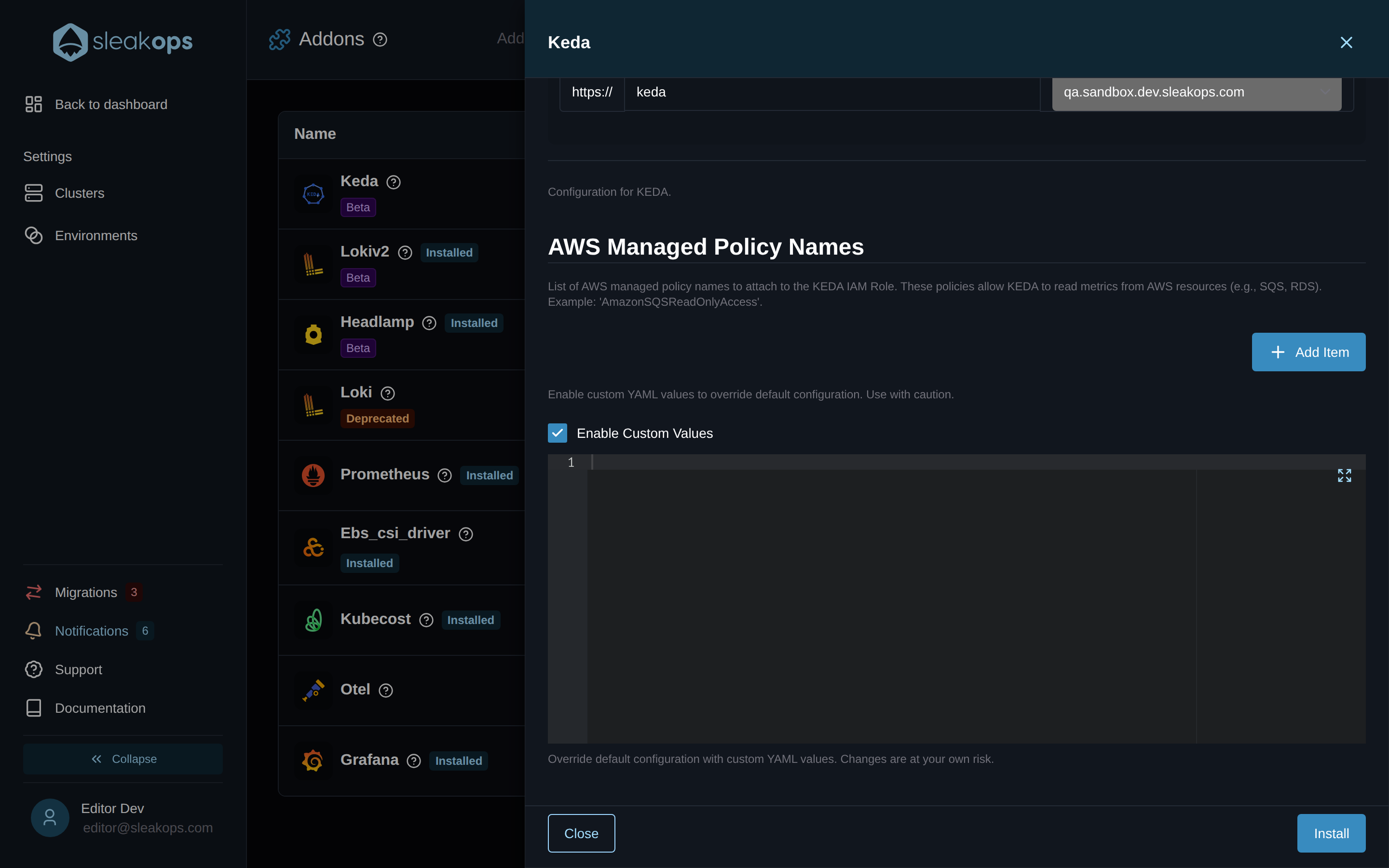
Custom Values override the defaults that SleakOps validates as part of the addon. Misconfigured values can break the operator, the metrics adapter, or the IRSA wiring. Keep the diff small and only change keys you understand. Refer to the official KEDA Helm values for the full reference.