Import a domain
This page covers importing an existing resource. If you haven't connected your AWS infrastructure to SleakOps yet, start with Install SleakOps on your infra.
Domain import isn't a separate flow — it's a section inside the Environment creation form. Creating an Environment normally provisions a brand-new Route53 hosted zone; the import option lets you reuse one that already exists in the target AWS account instead.
Prerequisites
- An admin user in SleakOps.
- The import feature enabled for your company.
Reuse an existing hosted zone
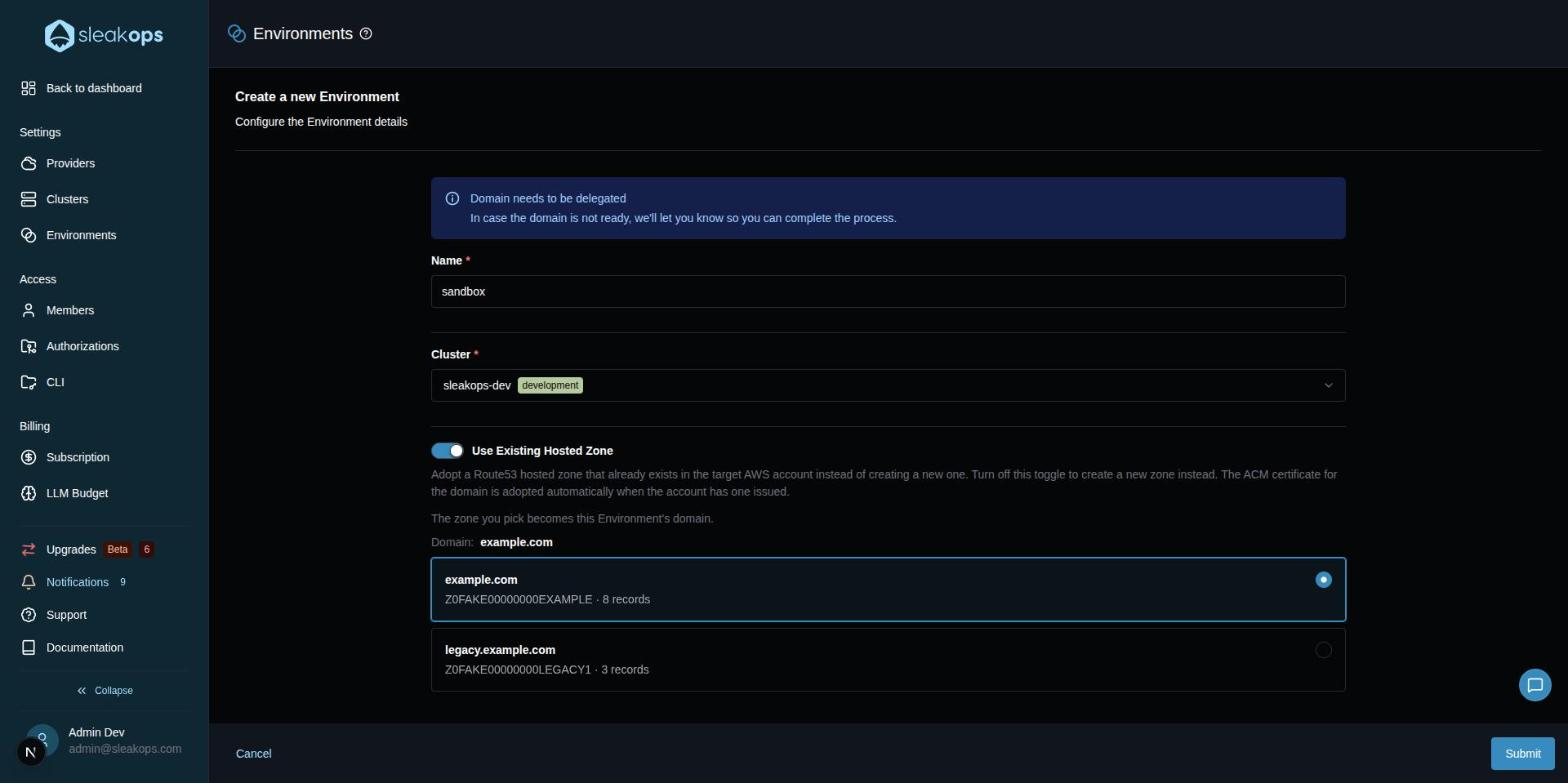
On the Environment creation form, a Use Existing Hosted Zone toggle sits below the base fields (Name, Cluster, Domain):
Adopt a Route53 hosted zone that already exists in the target AWS account instead of creating a new one. Turn off this toggle to create a new zone instead. The ACM certificate for the domain is adopted automatically when the account has one issued.
While the toggle is on, the Domain field is hidden: the Environment's domain is the name of the zone you pick. The Cluster determines which AWS account SleakOps searches, so the search needs a Cluster and a Name first:
- No Cluster selected: "Select a Cluster to search its account for existing hosted zones."
- Cluster selected but no Name yet: "Enter a Name to search this account for existing hosted zones."
Once both are filled in, SleakOps lists every Route53 hosted zone in that account, each with its zone ID, record count, and a Private badge if it's a private zone:
- Zones found: "The zone you pick becomes this Environment's domain." Pick one with the radio cards; the resulting Domain is shown above the list.
- No zones at all: "No hosted zones found in this account. Turn off this toggle to proceed — SleakOps will provision a new Route53 zone for the domain automatically."
With the toggle on, you must pick a zone before submitting ("Select the hosted zone to import"). Changing the Cluster switches the target AWS account, so it discards any zone you'd already picked. The provider's root domain can't be imported this way — SleakOps rejects it with "Root domain import is out of scope."
Once the Environment is created, the usual domain setup applies — see Setup your Domains and the Domain Delegation Guide for what comes next.
FAQs
What happens to the ACM certificate?
It's adopted automatically, along with the hosted zone, when the target AWS account already has one issued for the domain.